# Replacing 12K LoC with a 200 LoC Skill
David Gomes
AI Engineer Europe 2026
[Talk page](https://ai.engineer/talks/WE_Gnowy3uw-replacing-12k-loc-200-loc-skill) · [Video](https://www.youtube.com/watch?v=WE_Gnowy3uw)
## Replacing 12K LoC with a 200 LoC Skill
Cursor moved worktree orchestration into prompts and subagents, reducing maintenance and enabling new workflows while giving up enforced checkout boundaries.
Familiarity with Git branches, pull requests, and coding agents is helpful; worktrees and subagent coordination are explained as they appear.
### How much of a feature can become instructions?
[0:15](https://www.youtube.com/watch?v=WE_Gnowy3uw&t=15s)
What does it take to replace a maintained application feature—with its dependencies, tests, and specialized code—with Markdown instructions? David Gomes’s example is Cursor’s support for parallel agents in Git worktrees. The goal is to preserve the workflow while moving much of its orchestration into instructions an agent can follow.
A [Git worktree](https://git-scm.com/docs/git-worktree) is a separate checkout associated with the same repository. Different agents can work on identical or different tasks in separate folders without overwriting one another’s files. A file in an agent’s worktree can change while its counterpart in the primary checkout remains untouched.
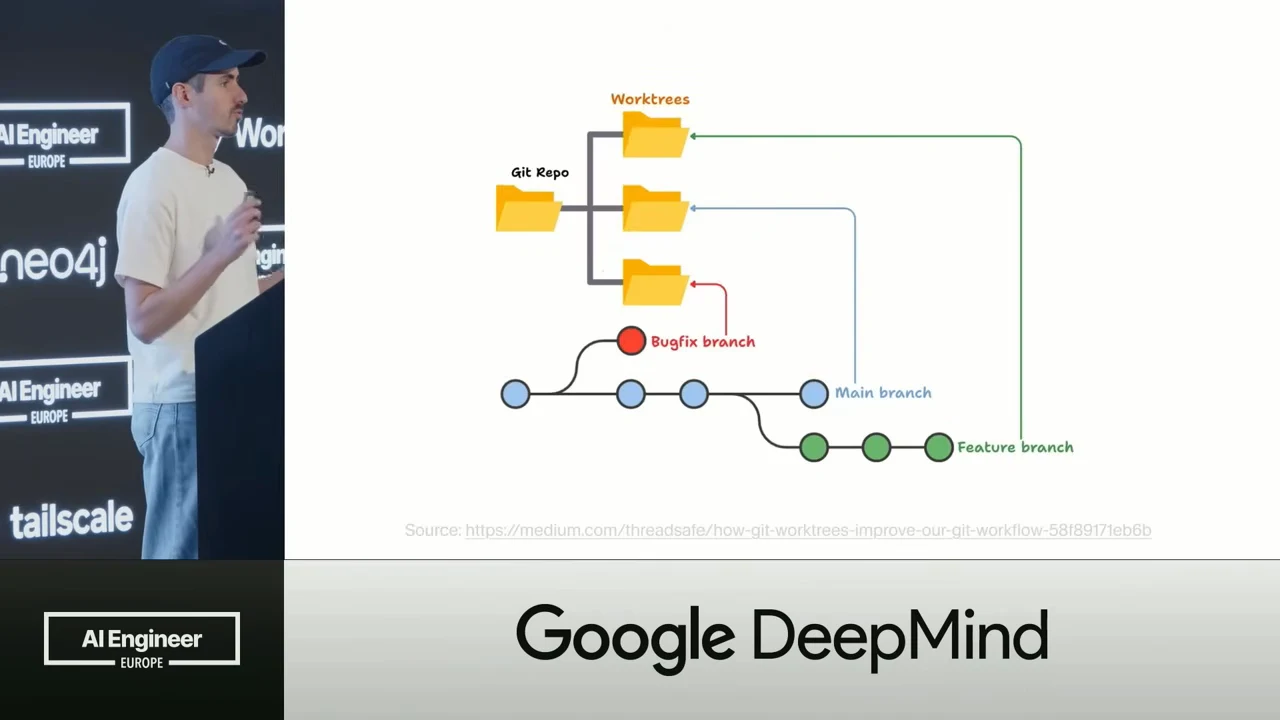
Git worktrees connect separate folders to branches in one repository.
In Cursor’s original implementation, commands and lint runs were scoped to the agent’s checkout. Users could watch a grid of agents working in parallel, then ask an agent to open a pull request containing its worktree’s changes. **Best-of-N** extended that workflow to competing implementations: give several models the same prompt, compare their results, and, for a front-end project, preview the different interfaces before choosing one. This arrived alongside [Cursor 2.0](https://cursor.com/changelog/2-0), released in October 2025.
### The code behind parallel checkouts
[3:10](https://www.youtube.com/watch?v=WE_Gnowy3uw&t=190s)
The visible workflow depended on several pieces of application machinery:
- **Lifecycle and context:** create worktrees, manage them, and tell each agent which checkout it was operating in.
- **Isolation and setup:** constrain agents to their assigned checkout and run user-configured setup scripts when work began.
- **Judging:** evaluate the competing implementations and show a thumbs-up recommendation.
- **Harness support:** add system reminders and other changes that helped agents stay on track.
- **Cleanup:** remove abandoned worktrees before users running hundreds of them exhausted their disk space.
The revised implementation removed much of this dedicated machinery, although worktree cleanup remained a responsibility.
Gomes estimates that his deletion PR removed around 15,000 lines of code. The revised overview shows a roughly 200-line skill; these are approximate descriptions of the refactor, not a reconciled before-and-after count. His assessment of the replacement is also qualified: it is almost as good as the old feature, much lighter to maintain, and better at some workflows. The question becomes which responsibilities existing agent primitives can absorb.
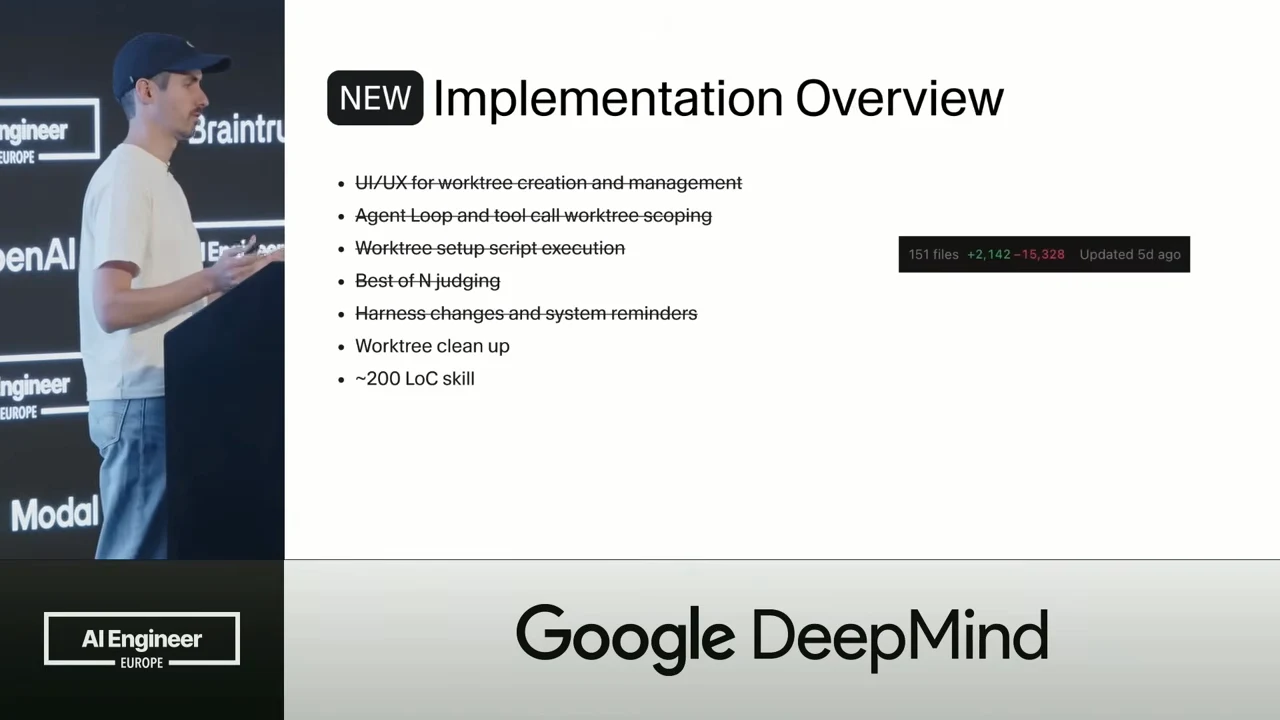
The new implementation crosses out five responsibilities, retaining worktree cleanup and adding a roughly 200-line skill.
### A parent agent becomes the coordinator
[4:58](https://www.youtube.com/watch?v=WE_Gnowy3uw&t=298s)
The replacement combines two existing primitives: [agent skills](https://cursor.com/docs/skills), which supply reusable instructions, and [subagents](https://cursor.com/docs/subagents), which let a parent delegate work. The first demonstration is deliberately small: invoke `/worktree` and assign the task “Fix a typo in the footer of the website.” The agent creates a separate checkout and performs the task there.
The worktree instructions describe a short procedure: create the checkout, run any configured setup scripts, and keep subsequent work inside that checkout. Expressed as a compact Markdown instruction body, that procedure looks like this:
```markdown
# Work in a separate checkout
Task: Fix a typo in the footer of the website.
1. Create a Git worktree for this task.
2. Run the user's configured setup scripts in that worktree.
3. Make the footer correction inside that worktree.
4. Run commands and checks from that worktree.
5. Keep all task edits out of the primary checkout.
```
The last instruction carries much of the burden: creating a directory is a discrete action, but staying in it is a constraint that must survive the rest of the session.
Best-of-N adds coordination around that same procedure:
1. The parent starts one subagent for each requested model.
2. Each subagent creates its own worktree and works inside it.
3. The parent waits for all subagents to finish.
4. The parent compares the implementations, offers criticism or grades, and helps the user choose, preferably in a table.
Gomes describes the Best-of-N prompt as around 40 lines of Markdown, compared with perhaps 4,000 lines of code in the previous implementation. The prompt delegates orchestration to capabilities already present in the agent system.
### The command contract
[7:19](https://www.youtube.com/watch?v=WE_Gnowy3uw&t=439s)
The instruction set still has to account for the environment. It includes Windows-specific directions alongside Linux and macOS directions, tells the parent to run configured setup scripts for each worktree, and emphatically tells the model not to leave its assigned checkout. That last requirement is handled through prompting.
| Command | Purpose |
| --- | --- |
| `/worktree` | Start work in a separate checkout. |
| `/best-of-n` | Give the same task to multiple agents. |
| `/apply-worktree` | Bring side-checkout changes into the primary checkout. |
| `/delete-worktree` | Remove the side worktree. |
These commands cover both starting isolated work and managing what happens to its result.
Although Gomes calls the replacement a skill, the demonstrated implementation technically uses **Cursor commands**. Like skills, their prompts enter context on demand, when the user invokes them. Cursor chose commands so it could control the prompts on its backend: an improved prompt could reach the next invocation without requiring a client update. That deployment mechanism is part of this implementation, distinct from the general skill-package documentation.
The Best-of-N demonstration assigns one task to **Kimi**, **Grok**, **Composer**, **GPT**, and **Opus**. The parent starts five subagents, each with a separate context and its own worktree. Context separation keeps each delegated conversation distinct; the worktree supplies its separate checkout. Opus finishes later in this run, and the parent then compares all the implementations.
The comparison can identify which models took essentially the same approach and which contributed something unique. It also supports a follow-up that the previous selection interface could not express: ask the parent to combine a preferred part of Opus’s implementation with a preferred part of GPT’s. The parent can use the independent results as material for a combined implementation instead of treating them only as candidates from which to choose one.
### Less maintenance, more flexible workflows
[9:58](https://www.youtube.com/watch?v=WE_Gnowy3uw&t=598s)
The maintenance savings matter because worktrees serve an advanced subset of Cursor users: people who actively want parallel execution and grids of agents. Gomes does not give an adoption rate. His product judgment is that this feature should not demand a disproportionate amount of maintenance from the team.
Moving orchestration into the conversation also removes some restrictions of the former interface:
- **Switch during a chat:** users can discuss a task first, then invoke `/worktree` when they decide to move the work into a side checkout. The old workflow did not support this transition, and adding more prompt-interface settings was unattractive.
- **Work across repositories:** the old implementation disabled worktrees for multi-repository setups. In the new workflow, an agent working across separate front-end and back-end repositories can create a worktree for each and open a pull request in each repository.
- **Judge and combine results:** the parent has richer context about what its subagents did. Users can ask it to stitch together useful pieces from several implementations, whereas the old experience required choosing one model’s result.
The flexibility comes from giving the coordinator access to the task and its evolving conversation, rather than fixing every workflow in advance in the interface.
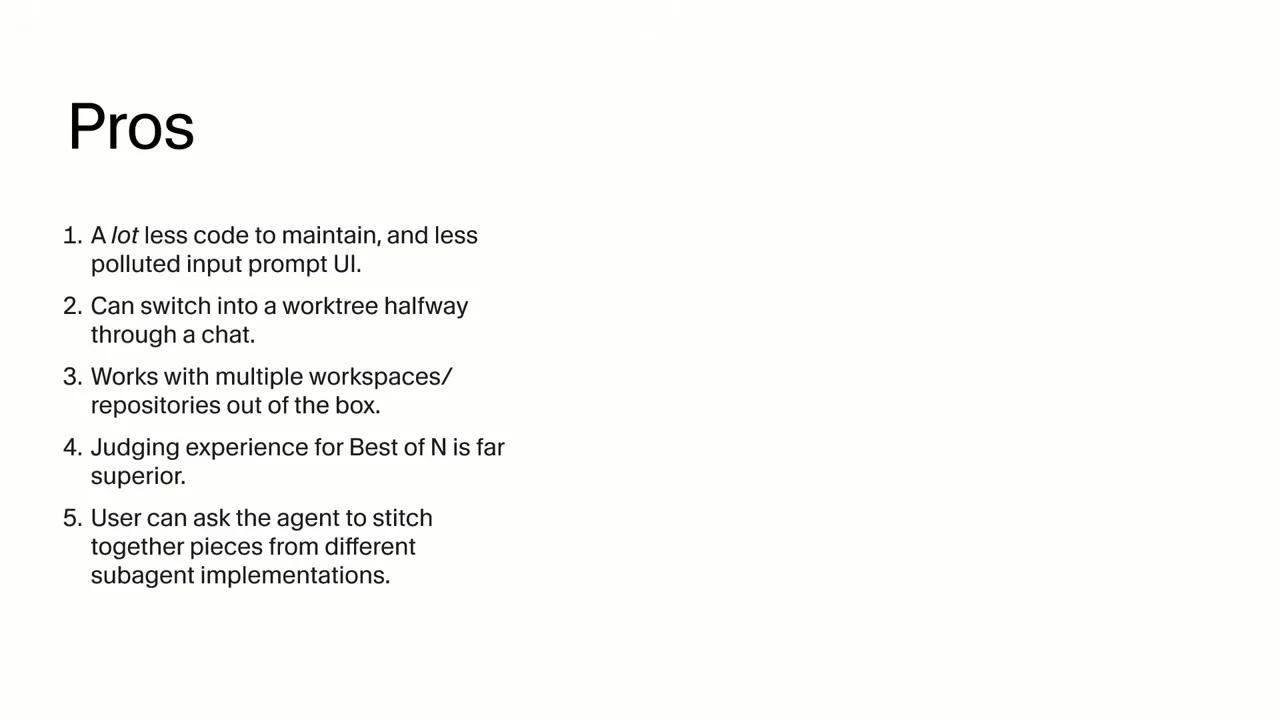
Five listed benefits cover maintenance, switching worktrees, multiple repositories, judging, and combining subagent implementations.
### Instructions replace an enforced boundary
[12:14](https://www.youtube.com/watch?v=WE_Gnowy3uw&t=734s)
The change received mixed feedback, including from users accustomed to the old workflow. The most consequential regression is checkout discipline. Gomes says the previous implementation prevented the model from touching files outside its worktree. The replacement tells the model which directory to use and trusts it to comply.
**A directory instruction is not an enforced file-access boundary.** Over a long session, the model can forget where it should operate and begin changing the primary checkout. Gomes identifies weaker models as particularly susceptible to this drift. The refactor therefore changes more than where orchestration is implemented: it changes how a critical constraint is maintained, from application enforcement to model behavior.
There are also costs in how the workflow feels and how users find it:
- **Visible setup:** worktree creation now appears as agent activity in the chat. Gomes says the new workflow feels slower without actually being slower; he supplies no timing measurements. Users see the agent doing setup that previously appeared to have been handled for it.
- **Reduced discoverability:** the old dropdown exposed local, cloud, and worktree execution. With that dropdown removed, users need to know `/worktree` exists before they can invoke it. The team accepts some loss of discoverability for an advanced feature.
These are separate problems: hiding setup activity would not fix checkout drift, and stronger checkout discipline would not make the command easier to discover.
### Evaluate both the intended work and the forbidden work
[14:13](https://www.youtube.com/watch?v=WE_Gnowy3uw&t=853s)
Cursor is pursuing two ways to improve adherence: use evaluations to improve the prompts, and add relevant tasks to reinforcement learning. Gomes says **Composer 2** had no RL tasks using these prompts or this kind of operating environment. The team was adding such tasks to its training pipeline, hoping to improve later Composer releases. For other providers’ models, Cursor can share feedback with the labs but cannot directly change their training.
For the evaluation harness, Gomes uses [Braintrust](https://www.braintrust.dev/docs/evaluate/write-scorers) and agent-assisted eval authoring, then runs tasks through the [headless Cursor CLI](https://cursor.com/docs/cli/headless). He describes two separate scorers:
| Scorer | Question |
| --- | --- |
| Intended work | Did the model do work in its assigned worktree? |
| Checkout violation | Did the model do work in the primary checkout? |
Both questions are necessary. An agent might make the requested change in its worktree and still modify the primary checkout along the way. Checking only the desired result would miss that violation.
The initial evaluations are simple and do not reproduce extremely long sessions, where Gomes sees behavior deteriorate. In these preliminary checkout-adherence tests, Gomes reports that **Haiku** often drifts into the primary checkout, while the tested Composer and Grok models do better. He provides no numerical scores or model-version breakdown. The observation points toward a model-dependent reliability problem within this workflow, not a general ranking of coding ability.
The next step is to make the cases more demanding, identify recurring failure patterns, and use those patterns to revise the prompts. Better system reminders are another proposed intervention: reinforce the assigned checkout during the session so the model does not lose the constraint as the conversation grows.
### Where native worktrees still belong
[17:05](https://www.youtube.com/watch?v=WE_Gnowy3uw&t=1025s)
The roadmap includes a partial return to native implementation. [Cursor 3.0](https://cursor.com/changelog/3-0) had already introduced an agent window organized around agents and chat while retaining code viewing and editing. Gomes describes a more complete native worktree experience for that window as planned work, not as a completed consequence of the release.
The reasoning is about where the workflow belongs. Users who want extensive local parallelization are likely to use an interface built around agents. In that setting, Cursor intends to provide more native worktree support while continuing to improve the instruction-based approach through evals, RL, and other training. The refactor does not eliminate the case for application code; it changes which interface and users justify that investment.
Git worktrees themselves also impose limits. They can take time to create, consume substantial disk space, and only work in Git repositories. Projects using something other than Git consequently lack this local parallelization option in Cursor. The team is investigating alternatives that do not depend on Git or Git worktrees, with details still to come. The remaining design problem is how to give concurrent agents separate working environments without inheriting all the costs and restrictions of the current primitive.
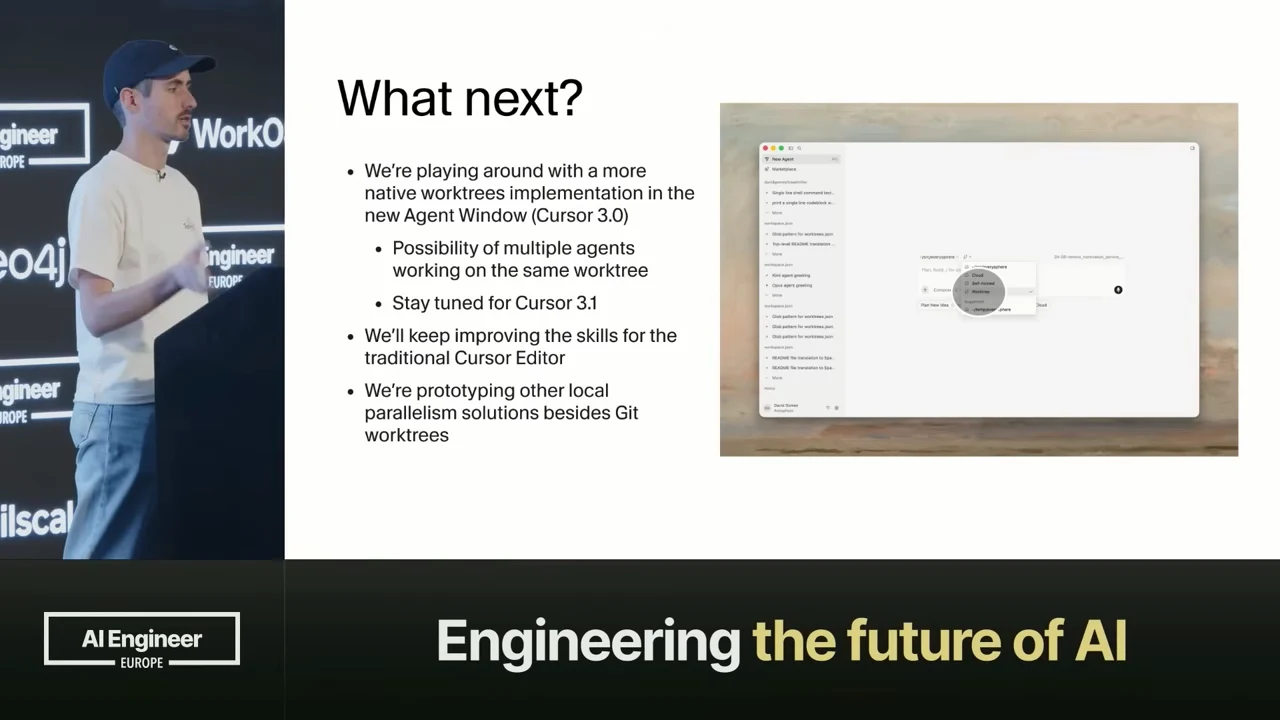
The roadmap includes native worktrees in the new Agent Window, continued skill improvements, and other local parallelism approaches.
## Resources
- [Cursor 2.0 release notes](https://cursor.com/changelog/2-0) — The original release announcement for parallel agents using worktrees or remote machines.
- [Cursor 3.0 release notes](https://cursor.com/changelog/3-0) — Introduces the Agents Window and documents the Editor's transition to worktree slash commands.
- [Worktrees and Best-of-N release discussion](https://forum.cursor.com/t/cursor-3-worktrees-best-of-n/156507) — The command announcement, Gomes's multi-repository clarification, and contemporary user feedback.
- [Cursor agent skills](https://cursor.com/docs/skills) — How skill packages supply reusable instructions and resources to Cursor agents.
- [Cursor subagents](https://cursor.com/docs/subagents) — Delegation, separate context windows, parallel execution and model configuration for subagents.
- [Cursor CLI for noninteractive automation](https://cursor.com/docs/cli/headless) — Current instructions for running Cursor CLI in scripts with print mode.
- [Writing Braintrust scorers](https://www.braintrust.dev/docs/evaluate/write-scorers) — Define separate evaluation criteria with custom code or model-based scorers.
- [Git worktree reference](https://git-scm.com/docs/git-worktree) — Official command reference for creating and managing additional working trees.
## Slides
### AI Engineer Europe
The AI Engineer Europe logo opens the recording against a black background.
[0:00](https://www.youtube.com/watch?v=WE_Gnowy3uw&t=0s) [AI Engineer Europe logo in white on a black background.](https://assets.ai.engineer/sites/aiecode2025/sha256/24e440bf5dfd4ecccd4fffdc9ef9243be07fff10b16e87c6b80fbc594828e3ea.webp)
AI Engineer
EUROPE
### Presenting Sponsor: Google DeepMind
Google DeepMind is the presenting sponsor.
[0:05](https://www.youtube.com/watch?v=WE_Gnowy3uw&t=5s) [Presenting sponsor Google DeepMind on a black background.](https://assets.ai.engineer/sites/aiecode2025/sha256/9a43b90b83b6eca77e82f00387f025461fb2cd84d99ed7f55e0f7cc2bbdddc7d.webp)
PRESENTING SPONSOR
Google DeepMind
### Platinum Sponsors
Braintrust, WorkOS, and OpenAI are listed as platinum sponsors.
[0:10](https://www.youtube.com/watch?v=WE_Gnowy3uw&t=10s) [Platinum sponsors Braintrust, WorkOS, and OpenAI on a black background.](https://assets.ai.engineer/sites/aiecode2025/sha256/2d35d6078675fe9a03b15d0c159e74531fc0a3308f8622c03ad0d462180cfe3c.webp)
PLATINUM SPONSORS
Braintrust
WorkOS
OpenAI
### Replacing 12K LoC with a 200 lines Agent Skill
David Gomes traces how Cursor replaced a complex feature with a lighter version implemented as a single Markdown skill.
[0:27](https://www.youtube.com/watch?v=WE_Gnowy3uw&t=27s) [Talk title slide by David Gomes, with the speaker visible at a podium.](https://assets.ai.engineer/sites/aiecode2025/sha256/24129eb938af42571e5fbe3e7668f2eadcd17b25a35d253b5a0ddca68c311f21.webp)
Replacing 12K LoC with a 200 lines Agent Skill
David Gomes
London, AI Engineer Europe 2026
AI Engineer Europe
PRESENTED BY Google DeepMind
Google DeepMind
Interface text:
151 files +2,142 −15,328 Updated 5d ago
[0:35](https://www.youtube.com/watch?v=WE_Gnowy3uw&t=35s) [Title slide for David Gomes’s talk about replacing 12,000 lines of code with a 200-line agent skill.](https://assets.ai.engineer/sites/aiecode2025/sha256/91086db2aa47cb2ba12d060aaef07633fcb37b9269bbfaf71fdda9aaab8ed4ad.webp)
Replacing 12K LoC with a 200 lines Agent Skill
David Gomes
London, AI Engineer Europe 2026
AI Engineer Europe
PRESENTED BY Google DeepMind
Google DeepMind
Interface text:
151 files +2,142 −15,328 Updated 5d ago
### Git worktrees and branches
Git worktrees give agents separate checkouts of one repository for parallel work. The diagram maps the main, bugfix and feature branches to separate worktrees.
[1:17](https://www.youtube.com/watch?v=WE_Gnowy3uw&t=77s) [Diagram linking a Git repository to separate worktrees for main, bugfix, and feature branches.](https://assets.ai.engineer/sites/aiecode2025/sha256/9f0de57da720cd0257cd2e45ecbb4fe6792fd449b9e4e44dc09ec15662a822e3.webp)
Worktrees
Git Repo
Bugfix branch
Main branch
Feature branch
Source: https://medium.com/threadsafe/how-git-worktrees-improve-our-git-workflow-58f89171eb6b
Interface text:
AI Engineer EUROPE
Google DeepMind
tailscale
neo4j
### Parallel worktree agents
Two agents work side by side: one adds a landing-page footer, while the other opens a pull request containing its radio-group changes. The speaker says each agent works in its own Git worktree.
[2:12](https://www.youtube.com/watch?v=WE_Gnowy3uw&t=132s) [Two side-by-side agent panes show a footer change and a pull request workflow.](https://assets.ai.engineer/sites/aiecode2025/sha256/ee3b3be307a3457cb06bedea377bb3d102112790cbe9647b4d1a1ed2435a72a3.webp)
Left agent
creaet a new footer component on the landing page
import { Button } from '@/components/ui/button';
import { LandingFooter } from '@/components/landing-footer';
import { ArrowRight, CreditCard, Database } from 'lucide-react';
page.tsx +2
Explored 1 file, lints
Run TypeScript check without emit cd, pnpm exec
Happy Thursday, David.
Here's what was added:
components/landing-footer.tsx
• Brand row: Same ACME + CircleIcon treatment as the header, plus a short blurb.
• Nav: Pricing, Sign in, GitHub, and Deploy (external links use rel="noopener noreferrer").
• Bottom bar: Border, copyright with the current year (from new Date().getFullYear()).
Styling follows the landing page: max-w-7xl, gray typography, orange accent, border-t on the footer.
app/(dashboard)/page.tsx
• Import and render after the last section, still inside .
Typecheck (tsc --noEmit) passes. If you want the footer on every route that uses this layout (not only /), we can move it into app/(dashboard)/layout.tsx next.
Right agent
open a PR please!
Checking git state and preparing a branch, commit, push, and PR.
Check git status, remotes, branches cd, git status, git remote, git branch, git log
Inspect package.json diff and current commit cd, git diff, git rev-parse
Creating a branch and committing only the radio-group changes (excluding unrelated package.json).
Verify GitHub CLI availability and auth which, gh auth
Create branch and commit radio-group changes only cd, git checkout, git add, git commit
Push branch and open GitHub PR cd, git push, gh pr
Happy Thursday, David.
The PR is open: refactor(ui): RadioGroup raw CSS (no Tailwind utilities) (branch refactor/radio-group-raw-css → main).
Only those files were committed: components/ui/radio-group.tsx and components/ui/radio-group.module.css. Your local package.json packageManager line is still uncommitted so it doesn’t ride along on this PR; say if you want that in a separate change.
Interface text:
saas-starter
New footer component for land...
page.tsx
new-footer-lp-gmh
Radio group component refact...
radio-group.tsx
radio-raw-css-sma
2 Files
Apply
Review
Ask follow-ups in the worktree
Agent
Composer 2
Fast
Cursor Tab
[Internal] Report Bug
### Comparing model implementations
Best-of-N runs the same footer task across models. The demo compares their changes alongside a webpage preview so the user can choose a visual implementation.
[2:22](https://www.youtube.com/watch?v=WE_Gnowy3uw&t=142s) [A model comparison panel appears beside a webpage preview with a footer.](https://assets.ai.engineer/sites/aiecode2025/sha256/565eef57e44365343d1beec632c0a24d8d3e6f8995aa56ca3df800f50cd2d481.webp)
Model comparison:
Composer 2: +36 -1
Composer 2: +49 -2
Codex 5.3: +7 -2
Codex 5.3: +12 -1
Opus 4.6: +113 -1
Opus 4.6: +100 -1
This option creates a [illegible] component and integrates it at the root layout level, providing site-wide footer coverage while also correctly adjusting the login page layout to accommodate the new flex structure. Read More
add a footer to the webpage
A site footer aligned with the header: ACME logo, links (Home, Pricing, Sign in, GitHub), top border, white background, same max-w-7xl horizontal padding as the header, and a copyright line.
app/layout.tsx
The app is wrapped in a column flex layout (min-h-[100dvh]) so the main area can grow with flex-1 and the footer sits at the bottom (mt-auto on the footer helps when content is short).
app/(login)/login.tsx
The outer wrapper no longer uses min-h-[100dvh]; it uses flex-1 so sign-in/sign-up share the space above the footer instead of stacking a full viewport block plus the footer and causing extra scroll.
The footer is global, so it shows on marketing, dashboard, auth, and other routes. To change links or copy, edit components/footer.tsx.
Next.js and React
Leverage the power of modern web technologies for optimal performance and developer experience.
Postgres and Drizzle ORM
Robust database solution with an intuitive ORM for efficient data management and scalability.
Stripe Integration
Seamless payment processing and subscription management with industry-leading Stripe integration.
Ready to launch your SaaS?
Our template provides everything you need to get your SaaS up and running quickly. Don't waste time on boilerplate - focus on what makes your product unique.
View the code →
ACME
Home Pricing Sign in GitHub
[illegible] 26 ACME. All rights reserved.
Interface text:
saas-starter
Webpage footer design
Next.js SaaS Start
footer.tsx
http://localhost:3000
3 Files Apply Review
Ask follow-ups in the worktree
Agent Composer 2 Fast
main
Cursor Tab [Internal] Report Bug
### Implementation Overview
The original implementation managed and isolated worktrees, ran user-configured setup scripts, judged model outputs, and cleaned up leftover worktrees to limit disk use.
[3:12](https://www.youtube.com/watch?v=WE_Gnowy3uw&t=192s) [Six implementation areas cover worktree management, agent scoping, setup scripts, judging, harness changes, and cleanup.](https://assets.ai.engineer/sites/aiecode2025/sha256/ea81ccd192da817457c019b30e4e7af7e669e35a8eb5cd617cbe5e5c6b46a2b1.webp)
Implementation Overview
• UI/UX for worktree creation and management
• Agent Loop and tool call worktree scoping
• Worktree setup script execution
• Best of N judging
• Harness changes and system reminders
• Worktree clean up
### Model comparison revisited
A thumbs-up marks Composer 2 in the model comparison. The speaker says a judge identifies the implementation that looks best against different criteria; the preview shows the webpage footer.
[3:41](https://www.youtube.com/watch?v=WE_Gnowy3uw&t=221s) [The model comparison panel and webpage footer preview return.](https://assets.ai.engineer/sites/aiecode2025/sha256/f412d56ee0e3bb88f54ca819cb93c95f4a87040f7dde437b9d566784fd02b35d.webp)
Composer 2
+36 -1
Composer 2
+49 -2
Codex 5.3
+7 -2
Codex 5.3
+12 -1
Opus 4.6
+113 -1
Opus 4.6
+100 -1
This option creates a properly reusable components/footer.tsx component and integrates it at the root layout level, providing site-wide footer coverage while also correctly adjusting the login page layout to accommodate the new flex structure. Read More
add a footer to the webpage
A site footer aligned with the header: ACME logo, links (Home, Pricing, Sign in, GitHub), top border, white background, same max-w-7xl horizontal padding as the header, and a copyright line.
app/layout.tsx
The app is wrapped in a column flex layout (min-h-[100dvh]) so the main area can grow with flex-1 and the footer sits at the bottom (mt-auto on the footer helps when content is short).
app/(login)/login.tsx
The outer wrapper no longer uses min-h-[100dvh]; it uses flex-1 so sign-in/sign-up share the space above the footer instead of stacking a full viewport block plus the footer and causing extra scroll.
The footer is global, so it shows on marketing, dashboard, auth, and other routes. To change links or copy, edit components/footer.tsx.
Next.js and React
Leverage the power of modern web technologies for optimal performance and developer experience.
Postgres and Drizzle ORM
Robust database solution with an intuitive ORM for efficient data management and scalability.
Stripe Integration
Seamless payment processing and subscription management with industry-leading Stripe integration.
Ready to launch your SaaS?
Our template provides everything you need to get your SaaS up and running quickly. Don't waste time on boilerplate - focus on what makes your product unique.
View the code →
ACME
Home Pricing Sign in GitHub
[illegible]26 ACME. All rights reserved.
Interface text:
Webpage footer design
Next.js SaaS Starter
footer.tsx
http://localhost:3000
3 Files
Apply
Review
Ask follow-ups in the worktree
Agent
Composer 2
Fast
saas-starter
main
Cursor Tab
[Internal] Report Bug
### Implementation Overview
The original implementation combined worktree management, agent scoping, setup and judging. Cleanup also mattered: users could create hundreds of worktrees and consume disk space.
[4:09](https://www.youtube.com/watch?v=WE_Gnowy3uw&t=249s) [Slide listing worktree creation, agent scoping, setup, judging, harness changes, and cleanup.](https://assets.ai.engineer/sites/aiecode2025/sha256/c4b81a61bcc7fdea96054af36630b2e8d8baee7ada7629462a7b1600a360f9a1.webp)
Implementation Overview
• UI/UX for worktree creation and management
• Agent Loop and tool call worktree scoping
• Worktree setup script execution
• Best of N judging
• Harness changes and system reminders
• Worktree clean up
AI Engineer EUROPE
Engineering the future of AI
### New Implementation Overview
The new implementation crosses out five earlier components, leaving worktree cleanup and a ~200 LoC skill. The speaker says a Cursor PR removed roughly 15,000 lines of code.
[4:25](https://www.youtube.com/watch?v=WE_Gnowy3uw&t=265s) [Revised implementation overview with five earlier tasks crossed out, worktree cleanup and a roughly 200-line skill retained, and a code-change summary.](https://assets.ai.engineer/sites/aiecode2025/sha256/cacf4d4fbfe055ff067cf7bfe0c818af641734af874d798c651d19e2a4f29a5b.webp)
NEW Implementation Overview
• UI/UX for worktree creation and management [crossed out]
• Agent Loop and tool call worktree scoping [crossed out]
• Worktree setup script execution [crossed out]
• Best of N judging [crossed out]
• Harness changes and system reminders [crossed out]
• Worktree clean up
• ~200 LoC skill
151 files +2,142 −15,328 Updated 5d ago
Interface text:
AI Engineer EUROPE
Google DeepMind
OpenAI
Modal
### Primitives
Cursor combines agent skills and subagents to reimplement its Worktrees and Best-of-N features with Markdown.
[5:02](https://www.youtube.com/watch?v=WE_Gnowy3uw&t=302s) [Slide lists Agent Skills and Subagents.](https://assets.ai.engineer/sites/aiecode2025/sha256/35286490f13da3c27604a3552fc2ce15966206ecb38247b83daa928910e14855.webp)
Primitives
1. Agent Skills
2. Subagents
Interface text:
AI Engineer
EUROPE
Engineering the future of AI
### Agent Skills
Cursor discovers skills automatically and loads resources on demand. The speaker pairs skills with subagents to reimplement Worktrees and Best-of-N in Markdown.
[5:13](https://www.youtube.com/watch?v=WE_Gnowy3uw&t=313s) [Cursor documentation describes agent skills as portable, version-controlled, actionable and progressive.](https://assets.ai.engineer/sites/aiecode2025/sha256/556c6cc8e35c3d1e085a271c7dd76427222e2e55b868988291d00969203c947d.webp)
Agent Skills
Agent Skills is an open standard for extending AI agents with specialized capabilities. Skills package domain-specific knowledge and workflows that agents can use to perform specific tasks.
What are skills?
A skill is a portable, version-controlled package that teaches agents how to perform domain-specific tasks. Skills can include scripts, templates, and references that agents may act on using their tools.
Portable
Skills work across any agent that supports the Agent Skills standard.
Version-controlled
Skills are stored as files and can be tracked in your repository, or installed via GitHub repository links.
Actionable
Skills can include scripts, templates, and references that agents act on using their tools.
Progressive
Skills load resources on demand, keeping context usage efficient.
How skills work
When Cursor starts, it automatically discovers skills from skill directories and makes them available to Agent. The agent is presented with available skills and decides when they are relevant based on context.
Skills can also be manually invoked by typing / in Agent chat and searching for the skill name.
Skill directories
Interface text:
CURSOR
Docs
API
Learn
Help
Search docs...
Ask AI
Dashboard
Get Started
Welcome
Quickstart
Models & Pricing
Changelog
Agent
Overview
Agents Window
Planning
Prompting
Debugging
Tools
Security
Customizing
Plugins
Rules
Skills
Subagents
Hooks
MCP
Cloud Agents
Overview
Setup
Capabilities
My Machines
Self-Hosted Pool
Bugbot
Automations
Best Practices
What are skills?
How skills work
Skill directories
SKILL.md file format
Frontmatter fields
Disabling automatic invocation
Including scripts in skills
Optional directories
Viewing skills
Installing skills from GitHub
Migrating rules and commands to skills
Learn more
Copy page
Share feedback
Explain more
AI Engineer EUROPE
PRESENTED BY Google DeepMind
Engineering the future of AI
### Subagents
Subagents run tasks in separate context windows and return results to a parent agent. The speaker says skills and subagents together can re-implement Cursor Worktrees and Best-of-N in Markdown.
[5:28](https://www.youtube.com/watch?v=WE_Gnowy3uw&t=328s) [Cursor documentation highlights context isolation, parallel execution, specialized expertise and reusability.](https://assets.ai.engineer/sites/aiecode2025/sha256/be97d9d5ee1d0264d6c4b712cc1225315b0734a898a2d7f98c2d71255415f0d3.webp)
Customizing
Subagents
Subagents are specialized AI assistants that Cursor's agent can delegate tasks to. Each subagent operates in its own context window, handles specific types of work, and returns its result to the parent agent. Use subagents to break down complex tasks, do work in parallel, and preserve context in the main conversation.
You can use subagents in the editor, CLI, and Cloud Agents.
Context isolation
Each subagent has its own context window. Long research or exploration tasks don't consume space in your main conversation.
Parallel execution
Launch multiple subagents simultaneously. Work on different parts of your codebase without waiting for sequential completion.
Specialized expertise
Configure subagents with custom prompts, tool access, and models for domain-specific tasks.
Reusability
Define custom subagents and use them across projects.
How subagents work
When Agent encounters a complex task, it can launch a subagent automatically. The subagent receives a prompt with all necessary context, works autonomously, and returns a final message with its results.
Subagents start with a clean context. The parent agent includes relevant information in the prompt since subagents don't have access to prior conversation history.
Foreground vs background
Subagents run in one of two modes:
Interface text:
CURSOR
Docs
API
Learn
Help
Search docs...
Ask AI
Dashboard
Get Started
Welcome
Quickstart
Models & Pricing
Changelog
Agent
Overview
Agents Window
Planning
Prompting
Debugging
Tools
Security
Customizing
Plugins
Rules
Skills
Subagents
Hooks
MCP
Cloud Agents
Overview
Setup
Capabilities
My Machines
Self-Hosted Pool
Bugbot
Automations
Best Practices
Security & Network
[illegible]
Why these subagents exist
When to use subagents
Quick start
Custom subagents
File locations
File format
Configuration fields
Model configuration
When the configured model won't be used
Using subagents
Automatic delegation
Explicit invocation
Parallel execution
Resuming subagents
Common patterns
Verification agent
Orchestrator pattern
Example subagents
Debugger
Test runner
Best practices
Anti-patterns to avoid
Managing subagents
Creating subagents
Viewing subagents
Performance and cost
Token and cost considerations
FAQ
Copy page
Share feedback
### Worktree demo
A /worktree branch=main request asks Cursor to fix a footer typo; the agent is still planning. The speaker says it will work in an isolated worktree.
[5:36](https://www.youtube.com/watch?v=WE_Gnowy3uw&t=336s) [Cursor agent is planning a request to fix a footer typo using a worktree.](https://assets.ai.engineer/sites/aiecode2025/sha256/1e59b34e9be12aeb8d639f2c213a56998b8711ab72a831da8af30b08e91437be.webp)
/worktree branch=main fix the typo in the company name in the footer
Planning next moves
Interface text:
saas-starter
New Agent
New Agent
Show Terminal
Show Files
Search Files
Maximize Chat
Add Repository
Add a follow-up
Agent
Composer 2
saas-starter
main
saas-starter
Cursor Tab
Server: Prod
[Internal] Report Bug
[5:40](https://www.youtube.com/watch?v=WE_Gnowy3uw&t=340s) [Cursor agent receives a worktree command to fix a footer typo.](https://assets.ai.engineer/sites/aiecode2025/sha256/729fb5b2c52933b07a9f6a11e80df7fb897e40f79eead060fbadd334aabba04d.webp)
/worktree branch=main fix the typo in the company name in the footer
Planning next moves
Interface text:
saas-starter
New Agent
New Agent
Show Terminal
Show Files
Search Files
Maximize Chat
Add Repository
Add a follow-up
Agent
Composer 2
0:08 / 0:08
1x
### Worktree command instructions
The /worktree instructions create a detached checkout, map each repository to its path, and direct the agent to keep later repository work there until the user stops it or applies or deletes the worktree.
[5:52](https://www.youtube.com/watch?v=WE_Gnowy3uw&t=352s) [Editor displaying instructions and shell commands for creating an isolated Git worktree.](https://assets.ai.engineer/sites/aiecode2025/sha256/6a187c05a48e1c7ccab987c1f8181c8c5c5a7badca3a1e1741f1d9082c65bad7.webp)
const GLOBAL_COMMANDS: GlobalCommandDefinition[] = [
{
name: "worktree",
argumentHint: "[branch=]",
content:
"Run task in a separate git worktree.\n\n" +
"**Optional argument:** If the user wrote `/worktree branch=` or `/worktree >`, use that ref as `WORKTREE_START_REF` (any commit-ish Git accepts: branch name, tag, full SHA, `origin/main`, etc.). Before the create block: Unix/macOS `export WORKTREE_START_REF=''`; Windows PowerShell `$env:WORKTREE_START_REF = ''`. If omitted, the script defaults to `HEAD`.\n\n" +
"Only do this if the user invoked `/worktree` or explicitly asked for a git worktree in this chat. On first touch for a repo, run the create block once with shell `working_directory` set to that repo's workspace folder, record `workspace folder -> REPO_ROOT -> WORKTREE_PATH`, and then use that `WORKTREE_PATH` for all later reads, edits, shell, and repo-local git in that repo until the user says to stop or uses `/apply-worktree` / `/delete-worktree`. Do not fall back to `REPO_ROOT` while that mapping exists.\n\n" +
"Multi-root: keep one chat-wide mapping, reuse it if two workspace folders share a repo, and create at most one worktree per `REPO_ROOT` unless the user explicitly asks for another.\n\n" +
"Use the create blocks below; do not hand-roll a different flow. Shared id: filesystem-safe `` + random 8-char lowercase hex `` -> `WORKTREE_ID=-` used for every repo in this chat.\n\n" +
"Unix/macOS (multi-repo safe: each repo gets its own subfolder under `~/.cursor/worktrees//`):\n" +
"```bash\n" +
"set -euo pipefail\n" +
'WORKTREE_ID="-"\n' +
'REPO_ROOT="$(git rev-parse --show-toplevel)"\n' +
'REPO_BASENAME="$(basename "$REPO_ROOT")"\n' +
"if command -v shasum >/dev/null 2>&1; then\n" +
' REPO_HASH="$(printf \'%s\' "$REPO_ROOT" | shasum -a 256 | cut -c1-12)"\n' +
"else\n" +
' REPO_HASH="$(printf \'%s\' "$REPO_ROOT" | sha256sum | cut -c1-12)"\n' +
"fi\n" +
'REPO_KEY="${REPO_BASENAME}-${REPO_HASH}"\n' +
'WORKTREE_SET_DIR="$HOME/.cursor/worktrees/$WORKTREE_ID"\n' +
'WORKTREE_DIR="$WORKTREE_SET_DIR/$REPO_KEY"\n' +
'mkdir -p "$WORKTREE_SET_DIR"\n' +
'if [ -d "$WORKTREE_DIR" ]; then echo "ERROR: worktree directory already exists: $WORKTREE_DIR" >&2; exit 1; fi\n' +
'WORKTREE_START_REF="${WORKTREE_START_REF:-HEAD}"\n' +
'git worktree add --detach "$WORKTREE_DIR" "$WORKTREE_START_REF"\n' +
'HEAD_COMMIT="$(git -C "$WORKTREE_DIR" rev-parse HEAD)"\n' +
'echo "WORKTREE_ID=$WORKTREE_ID"\n' +
'echo "REPO_KEY=$REPO_KEY"\n' +
'echo "WORKTREE_PATH=$WORKTREE_DIR"\n' +
'echo "REPO_ROOT=$REPO_ROOT"\n' +
'echo "HEAD_COMMIT=$HEAD_COMMIT"\n' +
'echo "WORKTREE_START_REF=$WORKTREE_START_REF"\n' +
Interface text:
everysphere — backend/server/src/commands/globalCommands.ts — Cursor
globalCommands.ts
backend > server > src > commands > globalCommands.ts > GLOBAL_COMMANDS > content
David Gomes (3 weeks ago) Ln 128, Col 119 [Internal] Report Bug
### Best-of-n command instructions
The parent agent launches one subagent per model, each in a dedicated git worktree. After all runs finish, it compares their results and recommends an option without merging a run into main.
[6:15](https://www.youtube.com/watch?v=WE_Gnowy3uw&t=375s) [Editor displaying the best-of-n workflow for parallel model runs in separate worktrees.](https://assets.ai.engineer/sites/aiecode2025/sha256/654aa26d29cb6c14d6dcec33b9d5a330642d5358b46b002b3e6c06fec61a9a4e.webp)
const GLOBAL_COMMANDS: GlobalCommandDefinition[] = [
name: "best-of-n",
content:
"Compare models on the same task.\n\n" +
"Run the same task in parallel across multiple model picks. Keep each run fully isolated in its own git worktree.\n\n" +
"**The primary worktree must remain completely unchanged while `/best-of-n` is running.** Never let a candidate read/write/edit/shell/git its way through the parent checkout once a dedicated worktree exists for that repo.\n\n" +
"**This command does not include applying or merging** any run onto the main worktree. Never copy patches to main or re-implement the winning attempt on the parent workspace as part of best-of-n.\n\n" +
"## Input Contract\n\n" +
"Expected format:\n\n" +
"`/best-of-n `\n\n" +
"Example:\n\n" +
"`/best-of-n opus,codex,composer pls do foobar`\n\n" +
"- `model_csv`: first token after `/best-of-n`, split by commas.\n" +
"- `task prompt`: everything after `model_csv`.\n" +
"- Preserve duplicates in `model_csv` (duplicates mean independent parallel runs).\n\n" +
"## Workflow\n\n" +
"1. Parse `model_csv` and `task prompt`.\n" +
"2. If either is missing, ask the user for model CSV and task prompt.\n" +
"3. Build model runs from CSV (split, trim, drop empty, preserve order and duplicates).\n" +
"4. The primary agent is only a coordinator. It must not do repo-local file reads, edits, shell commands, or git commands in the parent checkout for the task itself.\n" +
"5. Launch one `best-of-n-runner` subagent per model token in parallel.\n" +
"6. Each subagent must invoke `/worktree` first to create or attach to its own dedicated git worktree for the task, run any required worktree setup, and then do all repo-local work inside that worktree only. Do not fall back to the parent worktree.\n" +
"7. If a subagent cannot get its worktree into a usable state, that run should fail and report the blocker instead of continuing in the main checkout.\n" +
"8. After all complete: consolidated comparison and recommendation.\n" +
"9. **Stop.** Do not run apply scripts or merge any run onto main.\n\n" +
"## Per-Subagent Prompt Pattern\n\n" +
"- Use the `best-of-n-runner` subagent type.\n" +
"- Before doing task work, first invoke `/worktree` (the worktree command) for that run. Do not hand-roll an alternative worktree flow in the parent checkout.\n" +
"- After `/worktree` succeeds, stay inside that dedicated worktree for all repo-local reads, edits, shell commands, and git commands for the task.\n" +
"- Until `/worktree` succeeds, do not perform repo-local reads, edits, shell commands, or git commands against the parent checkout.\n" +
"- Return the worktree path and a concise outcome.\n" +
"- If worktree creation or setup fails, stop that run and report the failure. Do not continue in the primary worktree.\n\n" +
"## Output Format\n\n" +
"- Parsed model runs\n" +
"- One result block per run (including duplicates, plus its worktree path)\n" +
"- Final comparison and recommendation",
description:
'Fan out one task across multiple models and compare results only. Do not apply any run to main. Example: "/best-of-n opus,codex ".',
argumentHint: "[gpt,sonnet,composer] [task]",
Interface text:
globalCommands.ts
backend > server > src > commands > globalCommands.ts > GLOBAL_COMMANDS > content
David Gomes (3 weeks ago) Ln 342, Col 1 [Internal] Report Bug
### New Commands (Skills)
/worktree starts an agent in an isolated worktree; /best-of-n runs multiple agents on the same task. Cursor stores the command prompts in its backend so they can evolve without a client update.
[7:57](https://www.youtube.com/watch?v=WE_Gnowy3uw&t=477s) [Slide listing worktree, apply-worktree, delete-worktree, and best-of-n commands.](https://assets.ai.engineer/sites/aiecode2025/sha256/c95af188386bde46a08d88780aa52d59f9f5e8e522937c38dc786ceb640fe45d.webp)
New Commands (Skills)
• /worktree [branch=<...>] [...]
• /apply-worktree
• /delete-worktree
• /best-of-n [gpt,opus,composer,...] [...]
(Global Commands in Cursor work similarly to skills. The user can explicitly call them using a command. However, the prompts live in Cursor’s backend meaning we can evolve them over time.)
### Best-of-n demo prompt
A /best-of-n prompt gives Kimi, Grok, Composer, GPT, and Opus the same task: refactor the ui directory from Tailwind to SCSS.
[9:05](https://www.youtube.com/watch?v=WE_Gnowy3uw&t=545s) [Cursor prompt requests parallel model attempts to refactor UI styles from Tailwind to SCSS.](https://assets.ai.engineer/sites/aiecode2025/sha256/d575cab490d933846517b44c93146a090f70d8fbf417ede77c0e83e511354efe.webp)
/best-of-n kimi,grok,composer, gpt, opus refactor the ui directory to no longer use tailwind and just use SCSS
Interface text:
saas-starter
New Agent
Search Agents...
New Agent
Today
Company name typo in footer
Awaiting approval to run cd, pnpm ins[illegible]
Landing page footer typo
Read worktrees.json
Git commits summary for main bra[illegible]
No changes
Yesterday
General chat
Greeting conversation
Last 7 Days
say gi
Git commits summary for main bra[illegible]
Greeting conversation
Subagent greeting functionality
Removing README.md file
Ls command execution
More
Last 30 Days
Greeting conversation
Greeting conversation
(1) Greeting conversation
Browse Marketplace
Agent
Composer 2
Local
Try Plan Mode ⇧ Tab
saas-starter
main
saas-starter
0
0
Cursor Tab
Server: Prod
[Internal] Report Bug
## Full transcript
[0:00](https://www.youtube.com/watch?v=WE_Gnowy3uw&t=0s) [upbeat music] Hi, everyone.
[0:15](https://www.youtube.com/watch?v=WE_Gnowy3uw&t=15s) How you all doing? Thank you for, uh, coming today. Um, I'm going to be talking about how Markdown is basically the new code. Uh, as Teja's already sort of previewed, um, we recently replaced a lot of code in the Cursor application with just Markdown, just a skill.
[0:35](https://www.youtube.com/watch?v=WE_Gnowy3uw&t=35s) And in today's talk, I'm going to share a bit of the journey of going from a full-blown feature with a lot of code, a lot of dependencies, a lot of complexity and tests into a much more lightweight, trimmed-down version of the same feature effectively, but just with a single skill.
[0:57](https://www.youtube.com/watch?v=WE_Gnowy3uw&t=57s) Um, before I start though, I have to give you guys a little recap of Git worktrees and how they work in Cursor. Now, if you haven't heard of worktrees in Git, they're effectively like, um, separate checkouts, and I'm sorry for the wide screen.
[1:13](https://www.youtube.com/watch?v=WE_Gnowy3uw&t=73s) Um, but they're effectively like, like separate checkouts of your repos that allow you to work in parallel. So different agents can be working on the same task at the same-- or on different tasks at the same time without, um, interfering with each other.
[1:30](https://www.youtube.com/watch?v=WE_Gnowy3uw&t=90s) If you've never used this feature before in Cursor, the way it works is that you can spin up an agent on an individual worktree, um, and you will see, for example, the same file in two different worktrees, and you can see that they look different because then the agent is doing some work on, on the worktree, but
[1:48](https://www.youtube.com/watch?v=WE_Gnowy3uw&t=108s) not on your primary checkout. And any time the agent runs commands or lints or anything it does, will be isolated and scoped to that Git worktree. Um, with this feature, you can also, um, work even in parallel.
[2:05](https://www.youtube.com/watch?v=WE_Gnowy3uw&t=125s) At the same time on the screen, you can have, like, these grids of agents working for you. Um, and f- if you say, "Hey, open a PR," the agent will open a pull request from that worktree with the changes that it produced inside that worktree.
[2:19](https://www.youtube.com/watch?v=WE_Gnowy3uw&t=139s) And one of the coolest things about this feature is that it allows you to give the same task even to different models at the same time, and then compare what different models do on the same prompt.
[2:34](https://www.youtube.com/watch?v=WE_Gnowy3uw&t=154s) So if you haven't heard of this, we call it Best-of-N, and it's effectively a way for you to compete on, on diff-- have, have different models compete on the same task.
[2:46](https://www.youtube.com/watch?v=WE_Gnowy3uw&t=166s) And then you can even preview the changes. If it's a front-end, um, project you're working on, uh, you can, um, compare all the different visual implementations and then choose the one you prefer.
[2:58](https://www.youtube.com/watch?v=WE_Gnowy3uw&t=178s) Now, if you have never heard about this, all, all-- everything I'm talking about today, um, I will also just say that it all came out in around October of last year or alongside Cursor 2.0.
[3:10](https://www.youtube.com/watch?v=WE_Gnowy3uw&t=190s) Um, and when we initially shipped that, it came with a lot of complexity. Um, we had to write all the code for creating worktrees, managing these worktrees, feeding them into the agent as context.
[3:23](https://www.youtube.com/watch?v=WE_Gnowy3uw&t=203s) We also had to make sure that the agents were scoped and isolated, and they could not escape the worktree they were working on. Uh, we also have something called setup scripts, which users can configure and run, uh, and, and have Cursor run them anytime an agent starts operating on a given worktree.
[3:40](https://www.youtube.com/watch?v=WE_Gnowy3uw&t=220s) We also have the judging. So I didn't show you this before, but, uh, there's a little thumbs up icon on one of the models. That's just a, a judge that we run, um, that tells you which implementation looks the best based on, um, different criterion.
[3:54](https://www.youtube.com/watch?v=WE_Gnowy3uw&t=234s) Uh, and then we also had to make some changes to the harness, uh, and introduce some system reminders to help the agents stay on track in these worktrees. And then finally, there's, there's some cleanup complexity as well because people like to spin up hundreds of these worktrees, and then their disk sizes blow up, and we have to
[4:10](https://www.youtube.com/watch?v=WE_Gnowy3uw&t=250s) help them by cleaning up the, um, the, the worktrees that stay behind. Now, in our new implementation, the one that I'm gonna be talking about today, we were able to get rid of most of these things.
[4:24](https://www.youtube.com/watch?v=WE_Gnowy3uw&t=264s) And in fact, I recently opened a PR, uh, removing this entire feature from Cursor, and it was a massive, like, deletion of, of, of code. Like, I think it was around fifteen thousand lines of code deleted.
[4:36](https://www.youtube.com/watch?v=WE_Gnowy3uw&t=276s) The new implementation of the feature is almost as good as the previous one, um, and it is much, much more lightweight in terms of us to maintain it, um, and it even has some benefits compared to the previous implementation that I'll be talking about today.
[4:53](https://www.youtube.com/watch?v=WE_Gnowy3uw&t=293s) So how were we able to replace an entire feature with a skill?
[4:58](https://www.youtube.com/watch?v=WE_Gnowy3uw&t=298s) We decided that there are two primitives that we could use to effectively allow Cursor users to use worktrees by simply leveraging two primitives. One is agent skills and the other are sub-agents.
[5:11](https://www.youtube.com/watch?v=WE_Gnowy3uw&t=311s) So both of these are existing Cursor features. You can learn more about them in our docs. Uh, we have a page for skills, and we have a page for sub-agents.
[5:20](https://www.youtube.com/watch?v=WE_Gnowy3uw&t=320s) We realized that if we took these two things together, we could basically re-implement both the Cursor Worktrees feature as well as the Cursor Best-of-N feature with just Markdown. And this is a little video of how it works.
[5:33](https://www.youtube.com/watch?v=WE_Gnowy3uw&t=333s) So I can now, as a user, say /worktree, and then I'll give it some task. I'll say, "Fix a typo in the footer of the website." And this agent will run in an isolated worktree and do its work there.
[5:47](https://www.youtube.com/watch?v=WE_Gnowy3uw&t=347s) So the way the skill is written is actually really simple. I can show you most of it.
[5:55](https://www.youtube.com/watch?v=WE_Gnowy3uw&t=355s) Uh, it doesn't fit on the screen, but it's basically a set of instructions telling the model Um, how to create worktrees and, um, to run the setup scripts that the user might have configured, and then to stay on that checkout, right?
[6:10](https://www.youtube.com/watch?v=WE_Gnowy3uw&t=370s) We want to make sure that when the agent is operating on a worktree, it is staying in that checkout. Um, the Best-of-N skill is very similar. It's, um, actually even smaller.
[6:20](https://www.youtube.com/watch?v=WE_Gnowy3uw&t=380s) The entire skill fits on the screen here with, with a small, uh, font. Um, and what we're doing here is we're instructing the parent agent to go and create sub-agents for each model, and then spin up a worktree for each...
[6:34](https://www.youtube.com/watch?v=WE_Gnowy3uw&t=394s) Uh, so a- have each sub-agent create its own worktree, and work inside that worktree. Um, and then we also tell it to wait for all the sub-agents, and when they're done, please provide some commentary.
[6:47](https://www.youtube.com/watch?v=WE_Gnowy3uw&t=407s) Please let the user know, um, what, um, the different implementations by the different sub-agents look like. Maybe you can grade them, maybe you can make some, uh, criticism of them, and maybe you can help the user choose which one is the best.
[7:04](https://www.youtube.com/watch?v=WE_Gnowy3uw&t=424s) Um, and, and please give that to the user in some nice table format or something. But again, it's only around 40 lines of code, and it's all Markdown. Like, it's not even code.
[7:14](https://www.youtube.com/watch?v=WE_Gnowy3uw&t=434s) And the previous version of this was maybe four thousand lines of code.
[7:19](https://www.youtube.com/watch?v=WE_Gnowy3uw&t=439s) Uh, some of the considerations we have to have in this, in this skill is that the skill must be cross-platform compatible. Like, we have Windows-specific instructions, and we have Linux and macOS instructions as well.
[7:31](https://www.youtube.com/watch?v=WE_Gnowy3uw&t=451s) We also instruct the parent model to run the setup scripts for each worktree that the user might have configured. And then, and this is the hardest part, we'll spend a bit of time on this on the talk today, we have to instruct the model to stay on that worktree, right?
[7:43](https://www.youtube.com/watch?v=WE_Gnowy3uw&t=463s) We have to really say, "Hey, do not ever work outside this and do not ever, um, escape," right? Um,
[7:54](https://www.youtube.com/watch?v=WE_Gnowy3uw&t=474s) and we, we do that with some aggressive prompting, effectively. So, the new commands are /worktree and then /best-of-n to do the basic- basically, like, um, the, to start agents in isolated worktrees and to start multiple agents on the same task.
[8:12](https://www.youtube.com/watch?v=WE_Gnowy3uw&t=492s) And then we also have /apply-worktree and /delete-worktree to bring over changes from the side worktree into your primary checkout, and /delete-worktree just does, uh, what you would expect.
[8:24](https://www.youtube.com/watch?v=WE_Gnowy3uw&t=504s) Uh, a little note is that these are not actually skills in Cursor. They're actually commands, but the way these commands work in Cursor is extremely similar to how skills work in that they're-- the prompts only get loaded into the context if the user chooses to load them.
[8:41](https://www.youtube.com/watch?v=WE_Gnowy3uw&t=521s) Um, and the only reason we did it as commands and not as skills is so that the prompts for them can be controlled in our servers, in our backend.
[8:49](https://www.youtube.com/watch?v=WE_Gnowy3uw&t=529s) This means I can iterate on these prompts, um, without you having to update your Cursor version. Um, if I do some improvements to these prompts, the next time you use them, you're gonna have-- you're gonna get the latest version of the prompts.
[9:03](https://www.youtube.com/watch?v=WE_Gnowy3uw&t=543s) But effectively, they work like skills. Um, this is a demo of the Best-of-N, um, skill or command where I'm giving the same task to Kimi, Grok, Composer, GPT, and Opus.
[9:17](https://www.youtube.com/watch?v=WE_Gnowy3uw&t=557s) And w- what you will see is that the parent agent starts by spinning up five sub-agents on the five different models that I specified, and each one is gonna have its own worktree.
[9:27](https://www.youtube.com/watch?v=WE_Gnowy3uw&t=567s) Each, each one has its own context. And then Opus takes a little longer, as expected. And then at the end, the parent model, as instructed, will do that comparison ac- a- across all the different sub-agents.
[9:40](https://www.youtube.com/watch?v=WE_Gnowy3uw&t=580s) It'll say, um, "These two models did basically the same thing. This one did something that none of the others did." And you can even talk to the parent agent and you can say, "Oh, I like this part that Opus did, and I like this part that GPT did.
[9:53](https://www.youtube.com/watch?v=WE_Gnowy3uw&t=593s) Can you, can you mash them together?" And the, the, the parent agent will do that for you.
[9:58](https://www.youtube.com/watch?v=WE_Gnowy3uw&t=598s) Um, so let's talk about some of the pros of the new implementation, and then I'll talk about some of the, some of the, the, the cons, some of the things we lost, um, with this refactor.
[10:09](https://www.youtube.com/watch?v=WE_Gnowy3uw&t=609s) So the main pro of reimplementing this entire feature as a skill is that I have a lot less code to maintain. [laughs]
[10:18](https://www.youtube.com/watch?v=WE_Gnowy3uw&t=618s) Uh, selfishly, um, I'm going to be spending a lot less time maintaining this feature. And this is an a- an advanced feature, right? We're not talking about a feature that is used by ninety percent of Cursor's users.
[10:28](https://www.youtube.com/watch?v=WE_Gnowy3uw&t=628s) Far from it. Worktrees are kind of an advanced thing, um, and so only the Cursor power users that love parallelizing and having these grids of agents are using worktrees.
[10:40](https://www.youtube.com/watch?v=WE_Gnowy3uw&t=640s) So it's not the kind of feature where we want to be spending a lot of time with maintenance.
[10:47](https://www.youtube.com/watch?v=WE_Gnowy3uw&t=647s) Another advantage is that our users can now switch into a worktree halfway through a chat. It was not possible before. Um, we didn't want to pollute the prompt UI too much with all these, like, dropdowns and settings.
[11:01](https://www.youtube.com/watch?v=WE_Gnowy3uw&t=661s) And so now that it's just a slash command, it's much easier for, for users to switch to a worktree halfway through a chat. They can start talking about something, and then if they decide they wanna work on the side, they can do that with /worktree.
[11:13](https://www.youtube.com/watch?v=WE_Gnowy3uw&t=673s) Another big advantage is that the previous implementation did not work if you were working on multiple repos at the same time. So it's very common to have a multi-repo setup where maybe your front-end and your back-end are separate repos.
[11:27](https://www.youtube.com/watch?v=WE_Gnowy3uw&t=687s) In the past, you could not do worktrees in this kind of setup. It was just disabled. With the new /worktree command, everything works fine. The agent will make sure to create a worktree on each repo, and then if you open a PR, it'll open two PRs, one for each repo.
[11:43](https://www.youtube.com/watch?v=WE_Gnowy3uw&t=703s) It works quite well. Another advantage of the new skill implementation is that the judging experience at the end of knowing what model did which for Best-of-N is far superior.
[11:54](https://www.youtube.com/watch?v=WE_Gnowy3uw&t=714s) The parent now has a lot more context over what each of the sub-agents did, and the user can even ask the agent to stitch together little different piece, pieces and bits from the different implementations, which was not possible before.
[12:06](https://www.youtube.com/watch?v=WE_Gnowy3uw&t=726s) In the previous implementation, you had to choose one
[12:09](https://www.youtube.com/watch?v=WE_Gnowy3uw&t=729s) Sub-agent or one model and just s-stick with that.
[12:14](https://www.youtube.com/watch?v=WE_Gnowy3uw&t=734s) Now let's talk about some of the cons. And if you're curious, um, we have a forums link here where we're actually getting some mixed feedback on the new implementation.
[12:22](https://www.youtube.com/watch?v=WE_Gnowy3uw&t=742s) Like, some people were really accustomed to the old way of how the feature used to work. Um, and if you're curious, you can go and see that not everyone is happy with the change, at least for now, but we're, we're tracking.
[12:34](https://www.youtube.com/watch?v=WE_Gnowy3uw&t=754s) What are the problems? Number one, it's very hard for the agent to stay on track.
[12:39](https://www.youtube.com/watch?v=WE_Gnowy3uw&t=759s) With our previous approach, um, the agent had to stay on track. Like, it-- We didn't let the model ever touch any files outside its worktree. It was physically impossible for it to do so.
[12:51](https://www.youtube.com/watch?v=WE_Gnowy3uw&t=771s) Now we're trusting the model, so it's... You could say it's a bit vibes-based because we're basically saying, "Hey, operate on this directory," and, and, and then, like, you know, "Knock on wood, please, please don't forget about this."
[13:03](https://www.youtube.com/watch?v=WE_Gnowy3uw&t=783s) And especially over long sessions, it's quite possible that the model will forget where it should be operating. And sometimes these models, especially the worst models, will kind of hallucinate or they'll go a bit haywire, and they'll start doing things they shouldn't.
[13:17](https://www.youtube.com/watch?v=WE_Gnowy3uw&t=797s) But we're, we're working on this. Um, another con is that it feels slower because you're, you're seeing the agent create the worktree, and you're seeing that in your chat.
[13:29](https://www.youtube.com/watch?v=WE_Gnowy3uw&t=809s) It's not actually slower, but it does feel like the agent is kind of, like, wasting time doing something that should be done for it in advance. Um, we're also looking at some improvements here.
[13:40](https://www.youtube.com/watch?v=WE_Gnowy3uw&t=820s) And then finally, this is much harder to find the feature now, right? Like, before, whenever you opened Cursor, you had this dropdown that would show you, "Do you wanna run this task locally, or do you wanna run it in the cloud, or do you wanna run it in a worktree?"
[13:53](https://www.youtube.com/watch?v=WE_Gnowy3uw&t=833s) Now that entire dropdown is gone, and so if you want to use worktrees, you have to know the feature exists, so you can actually type /worktree. So the discoverability is a bit worse, but as I mentioned before, this is an advanced power user feature, um, which we're personally okay-- We're, we're, we're okay with being less discoverable in
[14:13](https://www.youtube.com/watch?v=WE_Gnowy3uw&t=853s) general. So how can we make the skill better? Um, as I mentioned, the biggest problem right now is that the agent is not really always staying on track. Uh, there's two ways that we're gonna improve this.
[14:26](https://www.youtube.com/watch?v=WE_Gnowy3uw&t=866s) One is with evals, and then using those evals to improve the prompts, and then the other one is through RL and training. So at Cursor, we train our own model called Composer.
[14:36](https://www.youtube.com/watch?v=WE_Gnowy3uw&t=876s) And for Composer 2, our-- the latest version of this model, we didn't have any RL tasks with these prompts. We di- we didn't have any tasks in all of the many, many thousands of tasks that we, um, used for RL actually operating in this type of environment.
[14:55](https://www.youtube.com/watch?v=WE_Gnowy3uw&t=895s) So we're working on adding a bunch of these tasks into our RL pipeline so that by the time we launch Composer 3 or 4 or 5, um, at least our own model will be much better at this.
[15:08](https://www.youtube.com/watch?v=WE_Gnowy3uw&t=908s) Obviously, we cannot improve the models that the other companies develop, but we've been sharing feedback with all the other labs and model providers on this kind of thing.
[15:16](https://www.youtube.com/watch?v=WE_Gnowy3uw&t=916s) And for evals, uh, I've been working on some evals for this feature, and it was actually my first time... Or not my first time, but one-- I'm, I'm fairly, um, early in my, um, my writing evals, uh, journey, and I was actually very surprised.
[15:33](https://www.youtube.com/watch?v=WE_Gnowy3uw&t=933s) If you use something like Braintrust, and shout-out to Braintrust, they've been super helpful, uh, writing these kinds of evals are s- is actually super, super easy. You don't have to know almost anything about evals, and you can just prompt the agent, and it'll do everything for you.
[15:46](https://www.youtube.com/watch?v=WE_Gnowy3uw&t=946s) Um, effectively, what I'm doing is I spin up the Cursor CLI. It's headless, so it's great for evals. Um, and then I have two scorers, one that checks to see if the model did any work in its worktree as expected, and then another one which is the reverse of that, which is did the model do any work
[16:05](https://www.youtube.com/watch?v=WE_Gnowy3uw&t=965s) in the primary checkout where it shouldn't be doing any work? Uh, and so far, the evals I've got are pretty simple, so I actually haven't been,
[16:15](https://www.youtube.com/watch?v=WE_Gnowy3uw&t=975s) um, able to simulate extremely long sessions, which is when the models start performing worse. But even so far, I've already understood that not all models are equally good at this.
[16:26](https://www.youtube.com/watch?v=WE_Gnowy3uw&t=986s) So for example, Haiku, which is a smaller, less intelligent model, will very often deviate and start working in the primary checkout. But the other models that I've been testing, such as Composer and Grok, um, are doing much better.
[16:42](https://www.youtube.com/watch?v=WE_Gnowy3uw&t=1002s) So I still have to improve these evals a lot more to make them more complicated. But the hope is that as soon as I can start to find patterns here, I can actually go and improve the prompts.
[16:53](https://www.youtube.com/watch?v=WE_Gnowy3uw&t=1013s) And then another thing we can do is have better system reminders to the models, uh, instructing them to stay on track and to not deviate from the worktree that they are supposed to be working in.
[17:05](https://www.youtube.com/watch?v=WE_Gnowy3uw&t=1025s) Okay. So what's next? Um, the first thing is we're actually going to take a, a small step back here, and we're actually going to have a much more
[17:16](https://www.youtube.com/watch?v=WE_Gnowy3uw&t=1036s) complete and native worktrees implementation in the new Cursor agent window. If you're, uh-- If you've been following, we recently announced Cursor 3.0. Part of 3.0 is a more agentic interface for coding, where you can still edit code and you can still see code, but the UI and the UX are much more optimized around the agent and the
[17:37](https://www.youtube.com/watch?v=WE_Gnowy3uw&t=1057s) chat interface. We believe this kind of interface is the right place for a proper worktrees implementation. The kind of person who is more likely to be, uh, doing a bunch of local parallelization is usually the same type of person that is more likely to use this type of UI.
[17:54](https://www.youtube.com/watch?v=WE_Gnowy3uw&t=1074s) So we're taking a small step back there and building a proper worktrees, uh, implementation that is more native, not so much agentic in the new UI. Also, we're improving the skills, um, as I mentioned, through this continued work on evals and then RL and other training work.
[18:12](https://www.youtube.com/watch?v=WE_Gnowy3uw&t=1092s) And then finally, we are actually looking into other parallelization primitives that are not Git worktrees. So if you've used Git worktrees, you might know that, uh, they can be a bit slow to create, um, and also to, uh...
[18:27](https://www.youtube.com/watch?v=WE_Gnowy3uw&t=1107s) they also use up a lot of disk space on your computer. Um, and then finally, uh, they only work in Git repos. So if you're using something other than Git, there's really no local parallelization primitive in Cursor.
[18:39](https://www.youtube.com/watch?v=WE_Gnowy3uw&t=1119s) Um, in the near future, we hope to, uh, share more about this, but we're looking into some other solutions for local parallelization that don't involve Git and don't involve Git worktrees.
[18:50](https://www.youtube.com/watch?v=WE_Gnowy3uw&t=1130s) Um, so yeah, stay tuned for that. Um, thank you all for coming to the talk today. Um, I'm sure many of you have questions, and I'm gonna be around all day.
[18:59](https://www.youtube.com/watch?v=WE_Gnowy3uw&t=1139s) Uh, feel free to grab me anytime and, uh, um, I'm happy to chat with anyone. Thank you. [applause] [outro jingle]