Machine transcription with reviewed terminology and names. Some recognition errors may remain. Timestamps refer to the original livestream.
7:26:05Hiya, my name is Jemima and I'm going to be talking to you about the cost of accessibility
7:26:09in AI, or as I like to call it, stop wasting tokens on building products that people can't
7:26:14use. Because at the end of the day, what is accessibility? Accessibility is the quality
7:26:18of being able to be used by anyone regardless of disability. So what this means is that when you
7:26:23read a product that is inaccessible, that product is inherently useless because people cannot use it.
7:26:28I think this is a very prevalent talk, especially in these days of vibe coding and prompt engineering
7:26:33and AI basically writing all the code for us. We need to ensure that even with all the code being
7:26:37written by AI, we're still building for humans and we're ensuring that humans are able to use
7:26:42the products that we are building. It's all very well and good to vibe code five different apps in
7:26:46one day, but if people can't use those apps, then is there really any point?
7:26:50A study by WebAIM shows that 96% of the homepages of the top 101 websites in the world have
7:26:55some form of accessibility issue or another.
7:26:57I'm someone that goes around a lot and speaks about accessibility, and whenever I ask why
7:27:01don't people build websites to be accessible, I usually hear it takes too long.
7:27:05While I will agree that accessibility is a labor and time intensive process, I do think
7:27:08that now that I've gotten to the stage of AI writing most of our code, it's actually
7:27:12easier to make things accessible.
7:27:13If anything, I would say it costs more time and more money to build inaccessible websites.
7:27:19So I tried to carry out a little experiment using the codebase at work.
7:27:22So I gave this prompt to the agents, it's just a simple prompt with no guidelines, implement this design from Figma.
7:27:27And I ran it twice, the first time without any accessibility skill and the second time by using the skill that I had written.
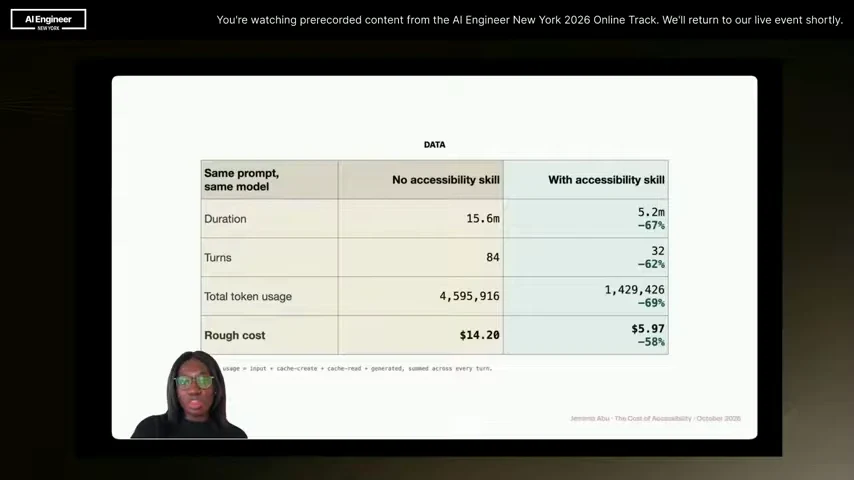
7:27:32And what I noticed was that not only was it faster for the agent to build the accessible skill, but there was also a 58% reduction in cost when using that skill.
7:27:41And we can take a look at the data here. We see that not only was it cheaper, but it also took a third of the time to finish the prompt while using the accessibility skill.
7:27:49So in conclusion, we can say that it is actually cheaper for AI agents to build accessible websites.
7:27:54We can say that, but we won't say that because this was a one-off experiment and it was not carried out in a constrained environment.
7:27:59So it cannot serve as empirical data that proves the fact.
7:28:01But when we look into the reasons why it took the AI agent much longer to carry out the prompts without any accessibility skills, then we can have a better idea of why exactly it is faster to build accessible websites.
7:28:12But before we get into that, hi, my name is Jemima Abu.
7:28:14I am a product engineer at Case, an alternative investment platform.
7:28:18I'm also a Google Dev expert, a Microsoft's MVP and a certified professional in accessibility core competencies.
7:28:23Basically, I like to go around talking about how to make the web a more accessible place.
7:28:26Also, I will give a slight disclaimer, while a lot of my examples relating to accessibility
7:28:30will be web-based because that is my area of expertise, this can also apply regardless
7:28:34of whatever platform you're working on, whether that's mobile or hardware or anything at
7:28:38all.
7:28:38So let's get back to it.
7:28:40This is your AI agent.
7:28:42Now, it's a super intelligent tool that can do almost anything in the world, but at the
7:28:45same time, it's just three years old.
7:28:47And much like a baby, AI is very impressionable.
7:28:50If you tell it enough times that the sky is red, eventually it will start to accept that
7:28:53the sky is red.
7:28:54What this means is as the responsible developers in charge, we have to make sure that we're providing the right skills and guidance for AI agents to build the product that we want them to build.
7:29:04There's a Japanese show on Netflix that I love called Old Enough.
7:29:06It's basically about toddlers being sent on their first errand.
7:29:09It can be like a three-year-old being sent to a supermarket to purchase groceries.
7:29:12And one thing I like about the show is that you can always see the steps that the parents have put in place before they send them on that first errand.
7:29:18So it might be that the child has gone with their parents to this market multiple times, or they provide a list that's very clearly detailed.
7:29:24It shows them where the supermarket is, what they need to get there, what paths to avoid.
7:29:28And it basically makes it a lot easier for the child to carry out that errand.
7:29:32It's the same thing with an agent. When you're giving an instruction to an agent, if I'm saying build this web page or implement this design,
7:29:37if I provide the right skills and prompts, it makes it a lot easier for that agent to avoid going down the wrong path
7:29:44and for the finished product to look like what I intended it to look like.
7:29:46So let's take a look at what happens when we don't provide any form of guidance for
7:29:50our agents in developing products.
7:29:52Firstly, human bias becomes AI bias.
7:29:54For years, humans have been developing websites or products that are inaccessible because
7:29:58frankly we just don't think that way.
7:29:59Especially as
7:30:00developers, we tend to have a it works for me mindset. So I'm like, this thing works on my laptop and it works the way I intended it to work and I'm not going to check anything else. I don't concern myself with if it works for screen readers or if it works in low-life environments. I'm just like, it works, it's built, I'm done. Whenever you build like that or if you have a code base that reflects that kind of mentality, once you put an AI agent in that code base, it's going to absorb all your biases. It's going to say, oh, we don't need to make these things accessible because that has not had
7:30:24a mentioned in the past so i'm just going to build things anyhow and then the more you use that ai
7:30:28agent to generate codes the more you build a code base that is inherently inaccessible because
7:30:33accessibility was never constrained in the first place secondly and this is something that i really
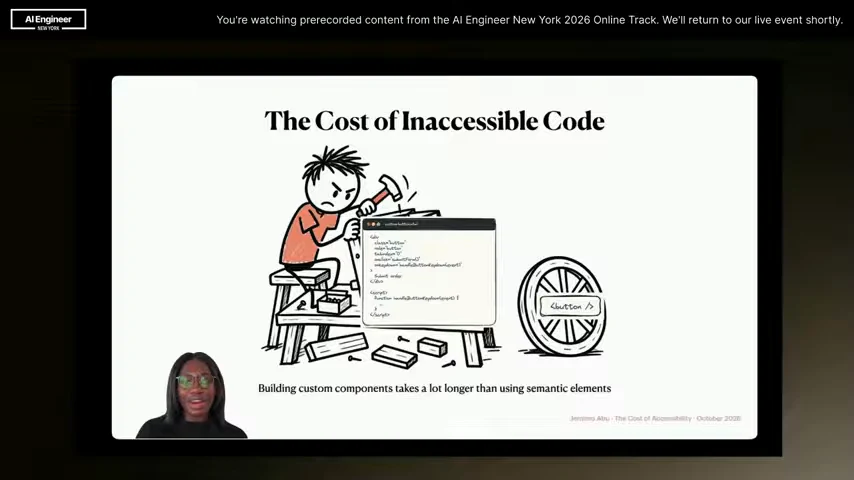
7:30:38noticed in the experiment ai tends to default to a lot of verbose code if you don't provide any
7:30:43particular prompts or guidelines for your agent it will reinvent the wheel as many times as it
7:30:47wants to so even if you tell it just build a simple accordion component or build a modal component
7:30:52it's not going to bother checking is there already an existing semantic element that can give me the
7:30:56same functionality it's just going to build one from scratch yeah it loves to write code so it'll
7:31:01go off and write as many things as it wants and as you can see here if you are trying to recreate
7:31:06a semantic element it takes a lot more time and effort because number one you have to carry out a
7:31:10lot more testing you have to implement a lot more features to replicate the native functionality
7:31:15and it's just a very cumbersome process so this is part of the things that you want to ensure you're
7:31:19focusing on when you're providing prompts to your agent. I saw an analogy once that said an accessible
7:31:23website is like a blueberry muffin. If someone hands you a plain muffin that they've shoved a
7:31:27bunch of blueberries on, similar to the picture on the right, that's not a blueberry muffin. For it to
7:31:32be a proper blueberry muffin like the one on the left, then the blueberries need to have been baked
7:31:35in from the start. It's the same thing on an accessible website. If you have a fully built
7:31:39website and then once it's done you start shoving in ARIA labels in different places, that is not an
7:31:43accessible website. For it to be an accessible website, you need to put accessibility at the
7:31:47forefront at every build process. And this does not just apply to developers. Accessibility is
7:31:52the responsibility of everyone. So we want to make sure that even from the business idea to design to
7:31:57QA, that we're ensuring that we're looking for accessibility and testing that can this product be
7:32:02used by everyone in the exact same way. And that actually we're waiting to the end to consider
7:32:06accessibility is that you waste a lot of time on regressive testing. So if you've waited until your
7:32:10website is fully built and then you start testing and going back to fix issues, you end up refactoring
7:32:14and rewriting a lot more code than you'd have had to do if you just built it to be accessible from
7:32:18the start. And then of course there are business consequences to building inaccessible products.
7:32:23The thing I hear sometimes is that a business might say oh but we don't have to consider
7:32:26accessibility because none of our users rely on assistive technologies. And I think that's very
7:32:30funny because it's sort of a self-fulfilling prophecy. It's not that your users don't rely
7:32:34on assistive technologies. It's that people with assistive technologies cannot use your website in
7:32:38the first place so they just never go to it. Imagine a business that didn't have a door.
7:32:43You would never get any customers. How would they get in the building?
7:32:45It's the same thing with building an inaccessible product.
7:32:48If you've built a product that people cannot use, then people will not use it.
7:32:51And then finally, there are legal repercussions to not making your website accessible.
7:32:55In the United States, the Americans with Disabilities Act states that any public-facing
7:32:58product must be accessible and can be used by people with disabilities,
7:33:01or you could face fines and even lawsuits. But on the plus side,
7:33:04you could get to use this really cute sticker on Microsoft Teams. So, you know, where you're off from.
7:33:09Based on all this, we can see that it actually is a lot more expensive to be building products
7:33:12that aren't accessible. You're exposing yourself to losing money from customers, possible lawsuits
7:33:18where you have to pay fines. You're spending more time building code and refactoring things. So if
7:33:22you do build your product to be accessible from the start, it's going to be a lot faster and a lot
7:33:26cheaper. So now that we know all that, how can we actually ensure that our AI agents are building
7:33:31things to be accessible? Because everyone's code base is different and we can be working with
7:33:35different technologies, I'm just going to give an overarching general view of how to get your
7:33:39agents to produce accessible code. So firstly, you need to define your accessibility requirements.
7:33:44Accessibility requirements differ based on what platform you're working on. So you do need to
7:33:48carry out research and ensure that you know what accessible requirements you're supposed to be
7:33:52meeting for the platform you are building for. Once that's done, you need to audit your existing
7:33:57code base. So if you're going to introduce an AI agent into your code base, you need to ensure
7:34:00that you don't have any pre-existing issues that the AI agent might copy as what it thinks is best
7:34:05behavior. So you can use automated tools to carry out accessibility testing, or you can even tell
7:34:10your AI agent to do it, but you won't identify any existing issues and then fix them before you start
7:34:15writing new features. Then you want to implement some sort of reusable system. This is a very nice
7:34:20to have, but basically if you're going to be working with accessibility, it's a lot easier to
7:34:24fix things in one component that is used in multiple places, as opposed to making fixes to
7:34:29the same components across different files. So just having an implemented design system or any
7:34:33form of reusable component library is going to save you a lot more time in the long run
7:34:37when making things accessible. And then finally, you want to enforce a mandatory accessibility
7:34:42skill. This is a skill that your AI agents will basically use anytime you're running anything
7:34:47related to maybe generating UI or writing code that requires accessibility. One skill that I
7:34:51really like to use is the Modern Web Guidance skill from Chrome. It's basically a skill that
7:34:55ensures that your agent is using the newest HTML and CSS features as opposed to custom JavaScript
7:34:59implementations. You can also have a lightweight version of an accessibility skill. I think this
7:35:03very important especially if you're like vibe coding where you're not working in a big code
7:35:06base you just want something quick that your agent can refer to and not carry out a lot of in-depth
7:35:09research this is what i would recommend for meeting like bare minimum accessibility requirements so
7:35:14you want to make sure that you're using semantic html wherever possible only reaching for aria
7:35:18when semantic html can't express the behavior every interactive element if it can be operated
7:35:22by a mouse it should also be operated by a keyboard you want to make sure that elements
7:35:26are properly labeled and can be read by screen readers and then finally before running the code
7:35:30your agent to carry out an audit against all those steps. Of course, this is not enough to build a
7:35:34fully accessible website. You still need to carry out a lot of manual testing yourself because it's
7:35:38not possible for one tool to make a website fully accessible. But just having these skills in place
7:35:43can help a lot more than not having them there at all. Regardless of why you use AI, most times the
7:35:48goal is to solve a particular problem. So just make sure that your solution is useful to as many people
7:35:53as possible. So build things to be accessible. And that is all. Thank you so much for listening to my
7:35:58talk i hope you enjoyed it if you do have any questions feel free to reach out to me online
7:36:02at jemima ambu that's linkedin twitter or github i would love to hear from you okay bye